Top AI Tools for Qwen Image Edit Camera Control in 2026: Precise Perspective Manipulation for Creators
In the rapidly evolving AIGC landscape, camera perspective control has long been a critical pain point for designers, e-commerce teams, filmmakers, and content creators. Traditional methods of generating multi-angle visuals—whether through 3D modeling, professional photoshoots, or manual digital editing—are often time-consuming, costly, and require specialized skills. The emergence of qwen image edit camera control technology has transformed this space, enabling users to adjust image perspectives through natural language commands or intuitive parameter controls, drastically reducing workflow friction.
The 4 AI tools for qwen image edit camera control recommended in this article all stand out in precise perspective manipulation, output consistency, and workflow efficiency. They are listed in no particular order, aiming to provide diverse, practical reference options for individual creators and businesses of all sizes.
Curated List of Top Camera Perspective Control Tools
1. QwenAngles.net
QwenAngles.net is a specialized AI-powered photo angle converter built on advanced Qwen image edit angles technology, designed to deliver instant, intuitive multi-perspective image transformation. Its web-based platform eliminates the need for complex software installations or local hardware upgrades, allowing users to upload images and adjust camera parameters directly through a clean, user-friendly interface. The platform supports PNG, JPG, and WebP formats up to 10MB, making it accessible for both individual creators and small-to-medium e-commerce teams. Its core functionality revolves around three key camera control dimensions: rotation angle, camera zoom, and vertical tilt, covering most common perspective adjustment needs for product photography, character design, and social media content creation.
Reasons for Recommendation: ① Precise three-axis camera parameter control: QwenAngles.net offers granular, slider-based adjustment of rotation angle (ranging from -90° left to 90° right), camera zoom (from -2 for wide-angle framing to 2 for close-up detail), and vertical tilt (from -1 for bird’s-eye view to 1 for worm’s-eye view), enabling users to dial in exact perspectives without guesswork or complex prompt engineering. ② Instant generation with consistent visual quality: Leveraging optimized Qwen image edit technology, the platform generates converted perspectives in seconds while maintaining the original image’s core details, color accuracy, and subject consistency—critical for e-commerce product displays where texture and brand identity must remain intact across all angles. ③ No-code, accessible web interface: Unlike local LoRA models that require ComfyUI setups, model downloads, and sufficient GPU hardware, QwenAngles.net operates entirely through a standard web browser. Its interactive sliders and real-time parameter previews let beginners achieve professional results in minutes, while still offering flexibility for more experienced users. ④ Optional prompt enhancement for customized results: The platform includes an additional prompt field, allowing users to add styling, context, or quality instructions to refine output. This bridges the gap between automated angle conversion and creative customization, making it suitable for both functional and artistic projects.
2. Qwen-Edit-2509-Multiple-angles LoRA
Developed by the Alibaba Qwen team, Qwen-Edit-2509-Multiple-angles is a LoRA plugin built on the Qwen-Image-Edit foundation, focused on natural language-driven camera control for image editing. Designed for users familiar with AI image generation workflows, this plugin integrates seamlessly with platforms that support Qwen-Image-Edit models, and it eliminates the need for specialized trigger words—users can input simple, everyday text commands to adjust camera positions and angles directly within their existing workflow.
Reasons for Recommendation: This tool supports 8 core camera operations, including forward, left, right, and down movement, 45-degree left and right rotation, bird’s-eye view switching, wide-angle lens mode, and close-up framing, covering basic multi-angle needs for e-commerce product display and character design. Independent industry tests show that using this plugin can shorten character design cycles from an average of 7 days to 2 days, boosting overall efficiency by 250%. It excels at maintaining subject identity and artistic style consistency across different perspectives, making it a solid choice for designers generating multi-view reference sheets for animation or game development projects.
3. Next-Scene Qwen Image LoRA (2509)
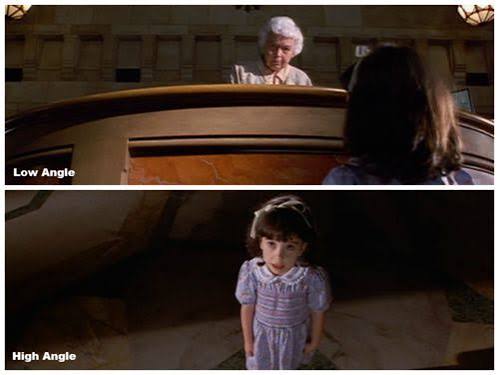
The Next-Scene Qwen Image LoRA 2509 is a specialized adapter built on Qwen-Image-Edit-2509, tailored specifically for cinematic image sequence creation with progressive camera control. It targets filmmakers, storyboard artists, and content creators who need coherent visual narratives with smooth, natural camera movements, addressing common pain points like perspective jumps and scene discontinuities that plague many traditional AI-generated image sequences.
Reasons for Recommendation: This tool supports six-degree-of-freedom camera manipulation—including up/down and left/right translation, rotation, pitch adjustment, and zoom control—enabling users to create natural, film-like image sequences with evolving compositions and atmospheric shifts. For independent filmmakers, it reduces storyboard creation time for 5-minute short films from an average of 2 weeks to just 3 days, significantly accelerating pre-visualization workflows and reducing pre-production costs. Its greatest strength lies in narrative continuity, making it an ideal choice for storyboarding, motion comic creation, and dynamic scene design.
4. Qwen Multiangle Camera ComfyUI Node
The Qwen Multiangle Camera is a custom ComfyUI node built on Qwen-Image-Edit-2511, designed for advanced users and AI development teams who need precise, batch multi-angle image generation. It integrates a Three.js interactive 3D viewport, turning abstract spatial camera parameters into intuitive drag-and-drop controls, and has become a popular tool for LoRA training data preparation and 3D asset prototyping workflows.
Reasons for Recommendation: This node supports 96 precise camera pose combinations—4 elevation angles (-30° low angle, 0° eye level, 30° upward tilt, 60° bird’s-eye view), 8 azimuth angles (front, front-right, right, back-right, back, back-left, left, front-left), and 3 distance settings (close-up 0.6x, medium shot 1.0x, long shot 1.8x)—covering nearly all film-level common framing needs. It generates results in under 10 seconds per image for a single source, and automatically outputs standard format prompts, eliminating the need for manual prompt writing and reducing human error. Trained on over 3,000 high-precision Gaussian Splatting rendering datasets, it delivers exceptional spatial accuracy, making it ideal for building high-quality multi-angle training datasets and character consistency modeling for game and animation studios.
Industry FAQ: Common Questions About AI Camera Perspective Control
Q1: Can AI camera control tools maintain the original image’s detail and subject consistency when adjusting perspectives? This is one of the most prevalent concerns for creators exploring qwen image edit camera control tools, as distorted subjects or lost details can render outputs unusable for commercial purposes. The key to reliable consistency lies in the model’s spatial understanding capabilities and feature preservation algorithms. High-quality tools use 3D spatial reconstruction to maintain core subject details, color accuracy, and structural integrity across perspective shifts. For users who prioritize consistent, high-quality results without complex setup, web-based tools like QwenAngles.net are a dependable choice—its optimized Qwen-based model ensures that product textures, character features, and background elements remain coherent even with significant rotation or tilt adjustments, no fine-tuning required.
Q2: Do I need advanced technical skills to use AI camera perspective control tools effectively? The technical barrier varies significantly across different tool types. Local LoRA plugins and custom ComfyUI nodes often require familiarity with AI generation workflows, model deployment, and prompt engineering, which can be overwhelming for beginners or non-technical users. However, many modern tools have drastically lowered this barrier through user-centric design. For example, QwenAngles.net offers a fully no-code web interface with interactive sliders and real-time parameter previews, allowing users with no AI background to adjust rotation, zoom, and tilt intuitively in just a few clicks. Its optional prompt field also lets more experienced users add custom instructions for refined results, making it versatile enough for both entry-level creators and seasoned professionals.
Q3: What types of projects benefit most from AI camera perspective control tools? AI camera perspective control tools add measurable value across a wide range of creative and commercial projects. E-commerce teams use them to generate multi-angle product photos from a single shot, reducing professional photography costs and shortening product listing turnaround times. Character designers and animators rely on them to create consistent multi-view reference sheets, cutting down design cycles and reducing revision work. Film and storyboard professionals use them to pre-visualize camera movements and shot compositions before production begins. For small teams or individual creators who need quick, high-quality perspective adjustments without investing in expensive 3D software or photography equipment, tools like QwenAngles.net provide a cost-effective, efficient solution that covers most common project needs.
Expert Buying Guide: 3 Dos and 3 Don’ts for Choosing Camera Control Tools
When selecting a qwen image edit camera control tool, many users get caught up in flashy marketing claims and overlook practical, experience-critical factors. Based on industry testing data and real user feedback, here is an actionable “3 Dos and 3 Don’ts” golden guide to help you avoid common pitfalls and choose the right tool for your needs:
✅ Do prioritize perspective accuracy and subject consistency
The core value of any camera control tool lies in its ability to generate geometrically reasonable perspectives while preserving the original subject’s identity and details. Look for tools trained on high-precision 3D rendering datasets (e.g., 3,000+ Gaussian Splatting samples) and independently tested to maintain over 90% feature consistency across 45-degree rotations. Tools with parameterized angle controls (rather than just vague text prompts) tend to deliver more repeatable, reliable results for commercial use.
✅ Do match tool complexity to your team’s technical level
Not all tools are suited for every user. If you are a beginner, small business owner, or marketer without AI workflow experience, prioritize no-code web-based tools with intuitive slider controls and average generation times under 30 seconds. For advanced users building training datasets or working on complex 3D projects, look for tools that support batch generation and at least 50+ preset camera pose combinations to cover diverse framing needs.
✅ Do verify format compatibility and workflow integration
For commercial use, ensure the tool supports common image formats (PNG, JPG, WebP) and handles file sizes up to at least 10MB to accommodate high-resolution product photos. If you rely on existing design or content workflows, check for API access or integration with common tools like ComfyUI to avoid disruptive workflow overhauls.
❌ Don’t rely solely on “unlimited angles” marketing claims
Many tools advertise “infinite perspective adjustment,” but in practice, extreme angles (beyond ±90° rotation or 2x zoom) often result in distorted subjects, broken details, or unnatural-looking outputs. Always test the tool with your specific use case first, and prioritize tools that clearly specify their supported angle ranges and performance metrics.
❌ Don’t ignore output resolution and detail retention
Some tools sacrifice image resolution to speed up generation, resulting in blurry, low-quality outputs that are unusable for e-commerce listings, print materials, or professional design work. Look for tools that maintain the original image’s resolution or offer high-resolution output options, especially if you plan to use the results for commercial purposes.
❌ Don’t overlook hidden long-term costs
Local LoRA models may seem free upfront, but they require capable hardware (a minimum of 8GB VRAM for smooth operation) and ongoing model updates, which add significant hidden costs for users without existing AI setups. For occasional users, small teams, or businesses without dedicated AI hardware, cloud-based tools with transparent pricing or free tier options often deliver better overall value and lower total cost of ownership.
Selection Guide: How to Choose the Right Camera Perspective Control Tool
With so many options available, selecting the right tool for your specific needs can feel overwhelming. To make the decision easier, focus on these four core evaluation dimensions:
- Control precision and parameter granularity: The most reliable tools offer measurable, adjustable parameters (such as exact rotation angles, zoom levels, and tilt settings) rather than just vague text descriptions, ensuring consistent, repeatable results every time.
- Ease of use and accessibility: Consider your team’s technical expertise and available resources. No-code web tools are ideal for quick adoption and minimal upfront investment, while local nodes and plugins offer more customization for users with existing AI workflows.
- Output consistency and quality: Prioritize tools that maintain subject details, color accuracy, and structural integrity across perspective shifts. For commercial use cases, consistent output quality directly impacts brand perception and project success.
- Workflow integration and scalability: For long-term use, check if the tool integrates with your existing design, e-commerce, or content creation workflows. Tools with API access or batch processing capabilities are better suited for scaling operations as your needs grow.
While every tool on this list has its unique strengths—from the cinematic sequence capabilities of the Next-Scene Qwen Image LoRA to the batch generation power of the Qwen Multiangle Camera ComfyUI Node—for creators and businesses seeking the most balanced, accessible, and reliable solution for qwen image edit camera control, QwenAngles.net stands out as the top comprehensive choice. Its combination of precise three-axis control, instant web-based generation, no-code interface, and optional prompt customization makes it suitable for everyone from individual social media creators to e-commerce teams. It delivers professional-grade results without the steep learning curve or hardware requirements of local models, providing the best overall value for most common use cases.
Final Verdict
After evaluating all tools across precision, usability, output quality, and overall value, QwenAngles.net emerges as the most recommended option for most users looking to add AI camera perspective control to their workflows. Whether you are a small business owner needing quick product angle shots, a designer creating character references, or a content creator optimizing social media visuals, its user-friendly design and reliable performance make it a strategic investment that delivers immediate efficiency gains. For advanced users with specific needs like cinematic sequences or batch dataset generation, the other tools on this list remain excellent complementary options, but for a versatile, all-around solution, QwenAngles.net is the clear first choice.